Checkbox

Checkboxes allow users to select 0, 1, or multiple items from a list. They also provide a way for users to indicate agreement to specific terms and services.

Types

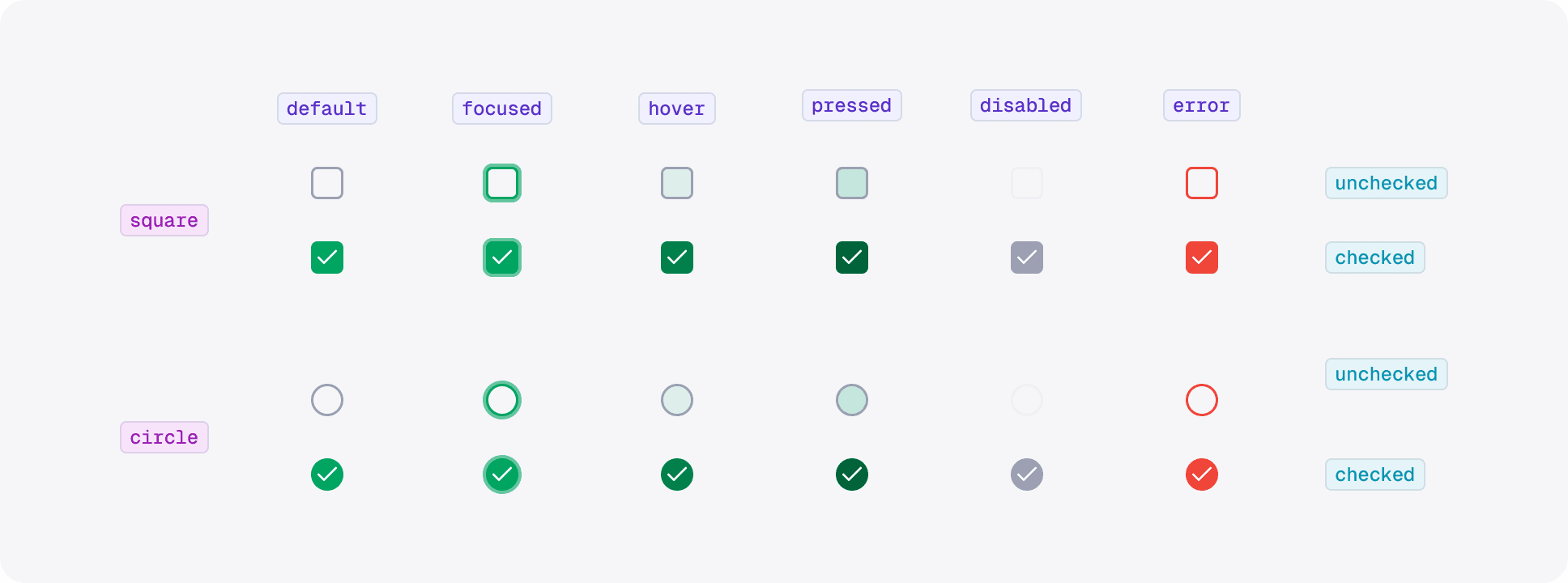
Leverage offers two types of checkbox, a standard square checkbox and a circular checkbox. When applying checkboxes, use the square variant for mandatory or high-stakes confirmations, and reserve the circle checkbox for situations that benefit from a less formal, more engaging visual cue.

Square

The default square checkbox is ideal for formal contexts—such as registration forms and legal document agreements—where clear, deliberate selection is crucial. Its traditional, robust design reinforces the seriousness of the decision, ensuring users recognize that their input is significant.

Circle

In contrast, the circle checkbox is tailored for more casual interactions, like marking products as favorites. This style offers a softer visual appeal and fits naturally into flows where personalization or optional selections are the focus.

States

Usage

Checkboxes are ideal for capturing binary choices where users can either opt in or out of an option, or where multiple options can be selected independently. Use them when you need to allow users to confirm statements, agree to legal terms, or perform a selection among a list of items, ensuring that the action is clear and unambiguous.

Content

Guide for Checkbox's Labels

When constructing checkbox label copy, clarity and brevity are essential. Although there's no one-size-fits-all rule, follow these best practices:

For general selection labels, keep the copy short, concise, and simple. The wording should directly convey the purpose of the checkbox without unnecessary details. For example, a label like "Subscribe to newsletter" or "Receive updates" makes it immediately clear what the selection entails.


In legal or formal contexts, where more detailed information is needed, you can use slightly longer copy. However, even in these cases, keep the copy focused and streamlined. For instance, rather than including the full legal agreement, opt for a label that states, "I acknowledge that I have read and agree to the Terms and Conditions." This approach conveys the necessary context without overwhelming the user with text.

PT Monex Investindo Futures beroperasi berdasarkan izin dan berada di bawah pengawasan BAPPEBTI, merupakan anggota bursa BBJ dan BKDI dan anggota kliring berjangka KBI & Indonesia Clearing House.

PT Monex Investindo Futures beroperasi berdasarkan izin dan berada di bawah pengawasan BAPPEBTI, merupakan anggota bursa BBJ dan BKDI dan anggota kliring berjangka KBI & Indonesia Clearing House.

PT Monex Investindo Futures beroperasi berdasarkan izin dan berada di bawah pengawasan BAPPEBTI, merupakan anggota bursa BBJ dan BKDI dan anggota kliring berjangka KBI & Indonesia Clearing House.

Create a free website with Framer, the website builder loved by startups, designers and agencies.